An AI agent web browser API for pages that need JavaScript
Until 3 August, the no-browser fetch path in our renderer had failed 100% of the time for about two weeks. The reads still came back. Each one fell through to a full Chrome render and held the one browser slot we have, and the raw Python error ended up in the warnings array of the response.
EnConvert is an AI agent web browser API for reading pages. Its /v2/perceive endpoint takes a URL and tries a fast no-browser fetch first for plain HTML reads. It renders in headless Chrome when that fetch looks blocked or scores under 0.40, or when the request needs a browser (a screenshot, a PDF, a wait, your own script). You get back the outputs you ask for (markdown, a screenshot, a PDF and others), plus a render_quality score and named deductions that grade the read the web reading API post covers that verdict).
It doesn't click through multi-step flows yet. My guess is that most of what agents call browsing is reading one page, but if yours has to click through a flow, the last section says who to use.
One keyword argument did it. The fast path fetches pages with curl_cffi using Chrome's TLS fingerprint. On every hop, redirects included, it pins the hostname to the address we just checked, to stop DNS from swapping in an internal address between our check and the connect. We passed resolve=[pin] to AsyncSession.get(). curl_cffi 0.15 has no such argument, so every attempt raised TypeError: AsyncSession.request() got an unexpected keyword argument 'resolve' and the renderer handed the read to Chrome.
The tests stayed green because our fake AsyncSession took **kwargs and swallowed resolve=. curl_cffi wasn't even installed in our dev environment, so nothing we ran locally, not even the live smoke script, ever touched the library itself. The fix moved the pin into curl's session options. The test change was bigger. The fake now rejects any keyword the real AsyncSession.request doesn't accept, and when curl_cffi is installed the allowed set comes from its live signature. If your agent's tests fake an HTTP client, I'd build the fake's accepted arguments from inspect.signature of the real call.
The fast fetch first, then Chrome
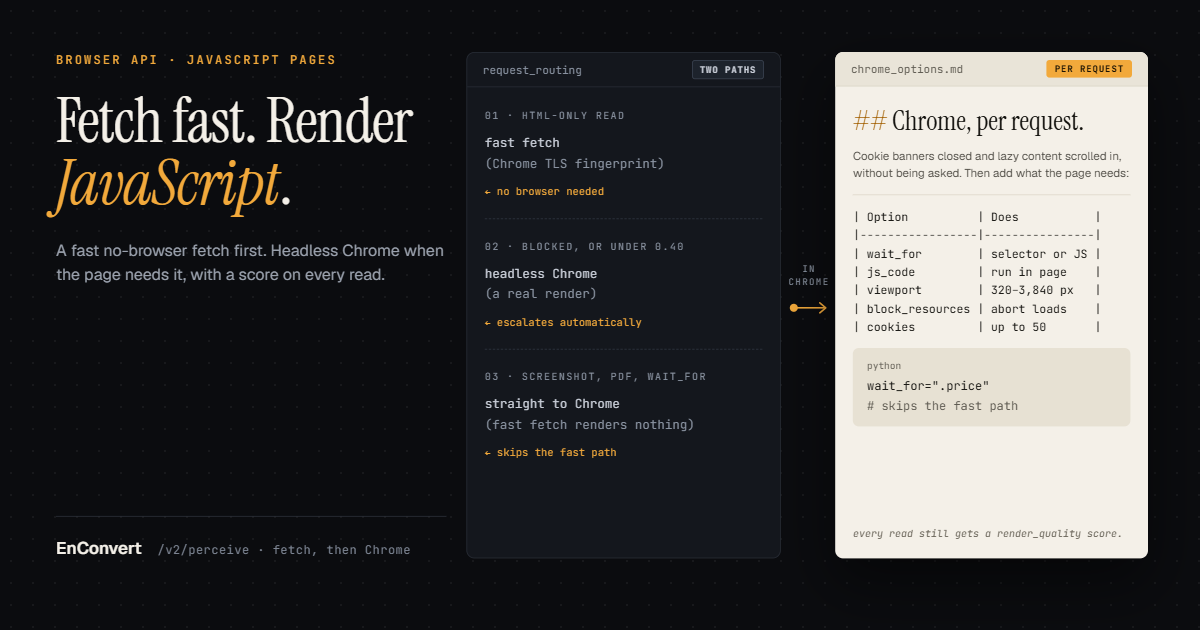
HTML-only reads try a fast fetch with a real Chrome TLS fingerprint first, and escalate to a real headless Chrome render when the page looks blocked or scores under 0.40. Screenshot and PDF requests go straight to Chrome, because the fast fetch doesn't render anything.
The reason for the fast path is capacity. We run in a single region, and our renders go through one node, one at a time (the trust page says both). A static docs page that reads fine without a browser shouldn't wait behind a React app that can't, and for those two weeks every read went through that one slot.
The Chrome side is Crawl4AI, the open-source crawler. Since 29 September it has driven Chromium 149 through patchright. Crawl4AI ships its own block detector (its flags show up in our warnings). We add the score on top, from 0 to 1 and built from named deductions, with a floor of 0.40 the web perception post has the arithmetic).
On the fast path, the score judges the HTML that came back and has no idea what the page would have become after its JavaScript ran. If a server-rendered page has enough static text to score 0.40 or better, that is your read, and no JavaScript ran. When you need the hydrated page (prices loaded from an API, a review list), ask for something that needs a browser. A wait_for selector, any js_code, block_resources, mobile: true, or a screenshot or PDF output keeps the request off the fast path.
Empty app shells that scored 1.0
Fixing the fast path exposed a gap in the scorer the same day. A single-page app served as an empty <div id="root"></div> with a static nav and footer scored 1.0, because the nav and footer had enough words to clear the empty-page check and nothing looked at the mount node. While the fast path was dead, every read went through Chrome, so the gap could only show up on a render where the app failed to hydrate.
So on 3 August we added unhydrated_shell. A framework mount node #root, #app, #__next, #__nuxt, #___gatsby, app-root or [data-reactroot]) holding fewer than 20 words, on a page under 500 visible words, costs 0.7. The page scores 0.30 and the read escalates to Chrome.
Watch (private beta) would have hit the same thing, diffing un-hydrated HTML against a baseline Chrome had captured and alerting on a page that hadn't changed. So watch checks now always render in Chrome, and each one takes the browser slot.
unhydrated_shell ignores pages with 500 or more visible words, and that's a hole. A shell wrapped in a big static footer and a mega-menu gets past it and passes on the fast path with an empty app in the middle. If you know a page is client-rendered, send a wait_for for an element the app draws, and the fast path is skipped.
Per-request options in Chrome
In Chrome, without being asked, we close the cookie banner (clicking accept if we can't find a close button), scroll to the bottom to trigger lazy-loaded content, handle sticky headers and give images time to load. Per request, you can add:
- wait_for: a CSS selector ".price" or "css:.price") or a JS expression "js:window.dataReady === true"). wait_timeout_ms defaults to 30,000 and goes up to 60,000. A timeout becomes a warning and the page is captured as it was.
- js_code: up to 20,000 characters, run in the page's own context after navigation and before wait_for, so you can click "load more" and then wait for the rows. An exception in your script becomes a warning.
- viewport: 1920 by 1080 by default, width 320 to 3,840, height 240 to 2,160. mobile: true means a 390 by 844 viewport unless you also send viewport. The user agent stays a desktop Chrome or Edge one, so a site that picks its mobile build by user agent won't send it.
- block_resources: abort resource types image, media, font, script, xhr and five more) before they load.
- cookies (up to 50), headers (up to 20) and auth (HTTP Basic), for a page behind a session you already hold.
- screenshot (a viewport PNG), screenshot_full_page (the page's measured height, with that measurement clamped at 25,000 px to protect memory) and pdf (one continuous page by default, paginated when you send pdf_options).
This reads a review page that loads more on a button click, then checks the result before trusting it. The same keys work as JSON on POST https://api.enconvert.com/v2/perceive.
import os
from enconvert import Enconvert

client = Enconvert(api_key=os.environ["ENCONVERT_API_KEY"])
op = client.v2.perceive(
    "https://example.com/reviews",
    outputs=["markdown", "screenshot_full_page"],
    js_code='document.querySelector("button.load-more")?.click()',
    wait_for='js:document.querySelectorAll(".review").length > 20',
    wait_timeout_ms=15000,
)

if op.is_blocked or (op.render_quality or 0) < 0.40:
    print("not the page:", op.status_code, op.deductions, op.billed)
elif any(w.startswith("wait_for did not complete") for w in op.warnings):
    print("rendered, but the reviews never loaded:", op.warnings)
else:
    print(op.outputs["markdown"].url, op.outputs["screenshot_full_page"].url)
Keep both conditions in that gate. A block page can clear the 0.40 floor and still set is_blocked.
Stuck renders, errors and retries
In an incident on 17 July, a render of an arXiv page hung and held our one browser slot for about 2.9 days. Our old timeout middleware answered the client with a 504 at 300 seconds but never cancelled the render underneath, so every conversion queued behind it got a 504 too. We rewrote it as a raw ASGI middleware that cancels the request task itself, which frees the slot, and a watchdog recycles the browser if any single render runs past 300 seconds. Cleaning up the pages a killed render leaves behind came later, in the 3 August changelog .
What each answer means, and when to retry (full table in the error reference):
- 200 with is_blocked: true or billed: false: a verdict, not a page, and outputs is {}. It isn't cached, so a retry gets a fresh render. Retry once at most.
- 503 with code: browser_restarting: Chrome died mid-render. Our fault. Wait the Retry-After (5 seconds) and retry.
- 503 "The conversion service is at capacity": the slot stayed busy too long. Retry-After: 30.
- 504 with code: upstream_timeout: the target site took too long to respond or finish loading.
- 504 {"error": "Request timeout"} with no code: the request ran past the gateway's 300-second budget.
- 422: the request itself is wrong, for example an unknown key or one of the reserved parameters below.
A read costs one op whichever path served it, cache hits within the hour included. An empty shell or a soft 404 still costs its op.
What this AI agent web browser API won't do yet
There are no browser actions yet. action_chain, along with proxy_url and geolocation, is in the request schema and returns a 422 saying it's not yet supported. Browser control is on our roadmap, as the MCP page says. I'm not putting a date on it. We don't solve CAPTCHAs or run residential proxies, and we don't get around paywalls. The whole API is still labelled beta.
Each call starts with an empty cookie jar, so a session your agent relies on goes in cookies every time. That works on perceive, not on /v2/ingest, which crawls sites into RAG chunks and takes no auth, cookies or headers by design, so nothing secret sits in a job record. And respect_robots defaults to false. Set it to true and a disallowed URL comes back as a 403. Whether your agent honours robots.txt is your call.
If your agent has to log in through a form or click through a checkout, use a tool that drives a browser. As of October 2026, Browserbase runs fleets of headless browsers, with Stagehand (MIT) to drive them. Since 11 March 2026 it has also sold Fetch, a page fetch with no browser session and no JavaScript. Browser Use is an MIT library for agents that operate a browser, and its cloud browsers come with proxy support and solve supported CAPTCHA challenges, which we don't.
Cloudflare's Browser Run is closer to what we do. It has quick actions such as /markdown, /json, /links and /scrape, and a /crawl endpoint in beta that respects robots.txt. Its docs say it doesn't bypass CAPTCHAs or other bot protection. The other verbs an agent needs (search, crawl, extract, watch) are in the agent web data post.
If the agent's job ends once it has read one page (even one that needs JavaScript or a click on "load more"), perceive covers it, and the score tells you whether the read worked. If the job needs a second page that only exists after the first one is submitted, you need a remote browser, and today that isn't us.
The keyless playground rejects wait_for, so try that one with a key. wait_for, js_code and screenshots all work on the free plan, which needs no card, and the parameters are in the perceive docs. Send me any client-rendered page that comes back empty but still scores 0.40 or better mail_to_het.