URL to Markdown API: 52.6% of our markdown lines were navigation
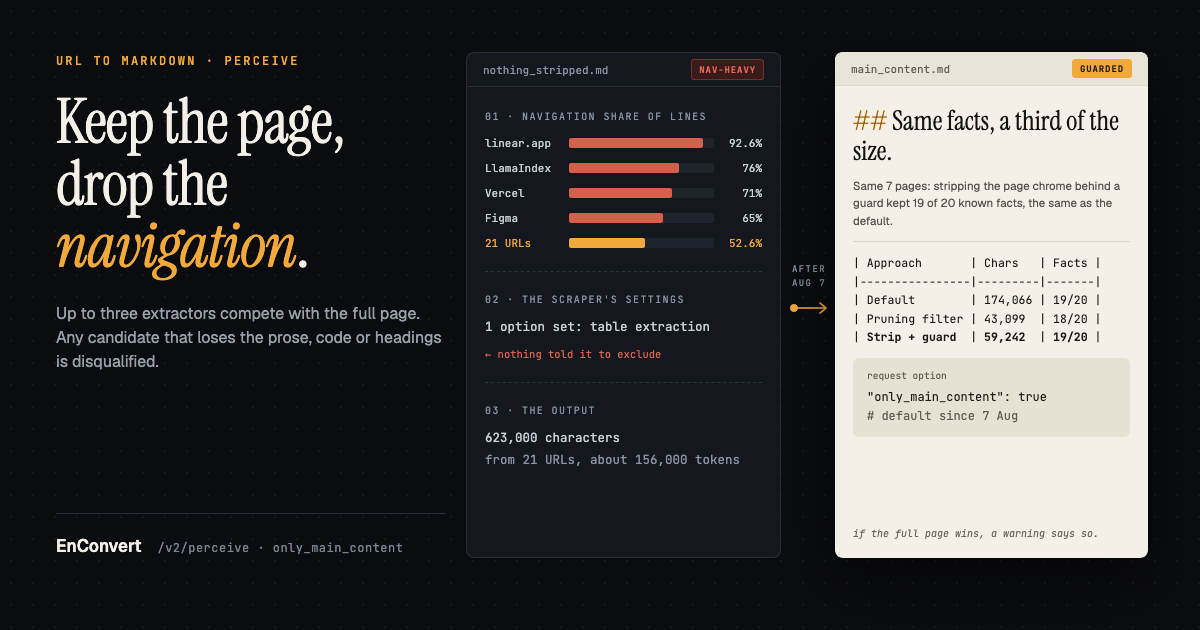
In the first week of August 2026 I measured what /v2/perceive, our URL to Markdown API, was returning in its default markdown output. Across 21 URLs it produced 623,000 characters of markdown (roughly 156,000 tokens), and 52.6% of the non-blank lines were navigation links. linear.app was the worst at 92.6%, then LlamaIndex at 76%, Vercel at 71% and Figma at 65%.
The cause was dull. We called Crawl4AI's scraper with exactly one option, table extraction, and never told it to exclude anything.
EnConvert turns a URL into markdown for AI agents: you send it to /v2/perceive and get the page back as markdown (or HTML, a screenshot, a PDF, links, images, structured data) from one render, with a render_quality score and named deductions on every read. Deciding what to delete without losing the docs took the first half of August. The check that mattered was counting what was still in the output after every change.
(I got these numbers by re-running an external QA team's 33 perceive tests. The LLM web scraping post has the rest of that week.)
Turning the filter up made it worse
The first thing I tested was turning the content filter up. I ran it on seven of the captured pages, and next to size I tracked how many of 20 known facts from those pages (sentences and code snippets) were still in the output.
Same 7 pages, August 2026 | Output size (chars) | Known facts kept |
|---|---|---|
Default markdown, nothing stripped | 174,066 | 19 of 20 |
Crawl4AI pruning filter (our | 43,099 | 18 of 20 |
Pruning filter, | 21,085 | 10 of 20 |
Pruning filter, | 16,404 | 7 of 20 |
Pruning filter, | 4,430 | 1 of 20 |
Readability (our v1 path) | 33,626 | 13 of 20 |
Strip page chrome behind a guard | 59,242 | 19 of 20 |
At min_word_threshold=50 navigation hit zero, and five of the seven pages (Chroma, Anthropic, qdrant, Vercel and linear) came back as a single newline character. On a clutter metric that's a perfect score, because there's no content left to be cluttered.
The pruning filter scores text density and deletes short nodes. In documentation the short nodes are often the important ones, inline code and link text especially. On the qdrant page, "stored in the ./qdrant_storage directory" became "stored in the directory", and every code fence came out empty.
Readability, the cleanest of our existing code paths (3.3% of its lines were navigation), cut the Chroma page to 113 characters and linear to 86. It's built for articles, not docs pages and landing pages.
No single extractor won on those seven pages. Our test suite at the time wouldn't have caught any of this. It had exactly one assertion about markdown content, assert b"Main Title" in md, against a fixture with no nav, header, footer, sidebar or code blocks. The rule I wrote down that week is that every markdown test has to check that the content survived.
What platform.claude.com and figma.com broke
Building the fix, an ensemble of extractors, took a live QA sprint on 7 August and fixes through mid-month. Four of the ways it broke came from two sites.
On platform.claude.com the <main> element is a 121-word scroll shell, and the article is an <article> next to it, not inside it. A pick that went by tag would lock onto that shell. The main-region step pools every <main>, <article> and [role=main] on the page and takes the wordiest. Even so, a nav-shell region slipped through there once during the build.
Same site, second bug. Next.js streaming SSR delivers the page inside <div hidden id="S:0">, and client JavaScript un-hides it. In a copy of the page captured before that script runs, the article sits inside a hidden div, and our first cleaning rule was that hidden nodes are junk. Deleting that wrapper deletes the page. The first exception was any hidden node that contains <main> or <article>. It wasn't enough. Later that month a hidden streaming payload on the same site still took the whole code sample and 2.3 KB of prose with it, and anything with that payload's shape now counts as content too.
On the same site, Readability kept every paragraph and dropped six of its nine heading texts, which is where the bare ## lines in our output came from. A heading is two or three words against thousands of body words. A prose-retention metric can't see one go missing. Headings got a separate check.
The figma.com bug was mine. BeautifulSoup's find_all(style=True) builds its list of matches up front, and I was removing hidden nodes while iterating over that list. When a hidden parent went, its hidden children stayed in the list as dead nodes, and calling .get on one raised an AttributeError. The exception was caught. The request succeeded, and the whole strip quietly fell back to the original page, nav and all, with no warning. A crash would have been easier to spot. Fixed by skipping nodes that are already gone. The full-page fallback also warns every time it fires now.
How /v2/perceive picks the main content now
With only_main_content on (the default since 7 August 2026), perceive cleans up the rendered DOM before any extractor sees it. Buttons and tab strips go unless they carry content of their own, and so do screen-reader-only labels, "Was this page helpful?" widgets and blocks a site marks data-nosnippet that don't hold headings, code or tables. Up to three extractor candidates then compete, alongside the full page.
Structural: removes
nav,header,footer,aside, forms, sidebars, tables of contents, breadcrumbs, cookie banners and hidden nodes, and aborts the strip if it leaves less than 45% of the page's visible words. When that guard fires, the aborted strip still competes, under the stricter rules below.Readability: readability-lxml's article extraction, converted with markdownify.
Main region: the wordiest
<main>,<article>or[role=main], given the same strip.
Each candidate is measured against a chrome-free baseline of the visible page, and it's disqualified if it:
keeps less than 70% of the baseline's prose words,
keeps less than 60% of the baseline's fenced code blocks (blocks under three words aren't counted),
drops section headings while keeping the text under them (two such headings, or the H1 on its own, is enough).
Of what's left, the candidate with the fewest junk lines (navigation lines plus empty headings) wins, and ties go to the shorter text. If the full page wins, warnings carries this exact sentence: "only_main_content: no extraction retained enough of the page's content; returned the full page instead (fidelity guard)."
The 70% floor came from the QA pages, where extractions that worked kept 85% or more of the prose and Readability's failure mode (a docs hub collapsed to a one-line stub) kept under 10%.
Code fences keep their language label in both modes. With only_main_content on, images usually come through as their alt text. A Next.js image CDN URL is routinely 120+ characters that tell a model nothing, and the full list is still available through outputs: ["images"]. (When the Readability candidate wins, image links stay in.)
Link-heavy blocks inside the article are pruned by where the links point (many unrelated domains, almost no prose per link). We tried link density first, and the numbers ruled it out. arXiv's tool sidebar scores 0.62 link-words per word, and the paper's author list right above it scores 0.67. Worse, a 62-row "document loaders" table on the LangChain docs scored 0.98 and got deleted outright. Tables are exempt from that pruning now.
A tidy pass then drops headings and links left with no text and collapses blocks that responsive layouts ship twice. We measured the changes announced on 13 August (the tidy pass and most of the DOM cleanup) on 14 live documentation and marketing pages. Output shrank 67% overall, and the two pages that grew had been losing content, including a dropped H1 and 12 section headings. (One notebook page fell by 94%, which is a story about embedding vectors) The DOM rules are listed in the Markdown quality section of the perceive docs. /v2/ingest runs the same pipeline on every page before it chunks it (the RAG ingestion post says why).
Calling the URL to Markdown API
curl -X POST https://api.enconvert.com/v2/perceive \
  -H "X-API-Key: $ENCONVERT_API_KEY" \
  -H "Content-Type: application/json" \
  -d '{"url": "https://example.com", "outputs": ["markdown"]}' \
  | jq '{render_quality, deductions, warnings, md: .outputs.markdown.url}'
For the whole page with nothing stripped, add "only_main_content": false. Unless you set truncate_data_arrays yourself, it's on when only_main_content is on and off when it's off. It shortens long runs of comma-separated numbers, like the embedding vectors on that notebook page. When both options are on and the tidied file comes out under half its original size, perceive also adds a warning. The Python and Node SDKs take only_main_content but don't accept truncate_data_arrays yet.
The same read in Python:
import os
from enconvert import Enconvert

client = Enconvert(api_key=os.environ["ENCONVERT_API_KEY"])
op = client.v2.perceive("https://example.com", outputs=["markdown"])

print(op.render_quality, op.deductions, op.warnings)
md = op.outputs.get("markdown")   # absent when the read wasn't billed (blocked, http_error, login_wall)
if md is not None:
    print(md.url)                  # 15-minute signed URL
If you need the file after those 15 minutes, GET /v2/perceive/{operation_id} re-signs the URLs (no re-render, no op). With "direct_download": true and a single artifact output, the bytes come back in the response instead. On the free plan the file itself is kept for an hour.
Read warnings for the fidelity-guard sentence. If it's there, you got the full page with its navigation. It only appears on a fresh read. A cache hit and GET /v2/perceive/{operation_id} don't carry it, so record it the first time you see it.
Then check render_quality and deductions before you trust the text. A read that's blocked, or whose deductions include http_error or login_wall, comes back with outputs: {} and billed: false. There's no markdown to misuse.
Soft 404s and empty shells are the case to watch. One that scores under 0.40 is delivered and billed like any read, and its markdown is a clean rendition of a page you didn't want. Gate on is_blocked or render_quality < 0.40 (the web reading API post explains why you need both).
v1 url-to-markdown or /v2/perceive
We have two endpoints that turn a URL into markdown, with different extractors.
POST /v1/convert/url-to-markdown (docs link) renders the page in headless Chromium (it dismisses cookie banners, scrolls to load lazy content, deals with sticky headers and waits for images), runs readability-lxml over it, converts with markdownify, and puts YAML front matter on top with url, title, description, links and images. It's the endpoint behind our URL to Markdown converter page. There's no score and no block flag in its response. If the page was a challenge page, nothing tells you.
/v2/perceive runs the ensemble above and scores the result. It doesn't add front matter (page metadata comes through the structured output), and it doesn't always open a browser. An HTML-only read like the one above tries a fast fetch with a real Chrome TLS fingerprint first, and moves to a real headless Chrome render only when the page looks blocked or scores under 0.40.
Our docs say to use v1 when you want one markdown file and nothing else, and v2 when you also want the screenshot, the links, the metadata or the bytes inline. After August I'd add one more reason. Readability does well on articles, and v1's front matter is handy there. For documentation and landing pages, or when your code has to tell a real page from a challenge page, use perceive.
Other ways to get markdown from a URL
Some sites will hand you markdown themselves. With Cloudflare's Markdown for Agents a client that sends Accept: text/markdown gets the page converted to markdown, with an x-markdown-tokens header carrying an estimated token count. It only works on zones whose owners turned it on (available on Pro, Business and Enterprise plans and to SSL for SaaS customers, per Cloudflare's docs as of October 2026), but asking costs you one header. Every page on enconvert.com also serves markdown if you append .md to its URL.
Jina Reader is a low-effort hosted option. Put https://r.jina.ai/ in front of a URL and you get the page back as LLM-friendly text, markdown under a short Title: / URL Source: header. It decides on its own between headless Chrome and a lightweight curl-impersonate fetch.
If you'd rather run extraction yourself, there's Mozilla Readability (the library behind Firefox Reader View) and Trafilatura (rule-based, with jusText and readability-lxml as fallbacks and Markdown among its outputs). Both are Apache-2.0 (Trafilatura since v1.8.0), as is Jina Reader's open-source branch. Crawl4AI, which our renderer runs on, has its own fit_markdown filter, the one in the table above.
The endpoint behind this post has its own page: URL to Markdown API