Perceive, the URL to Markdown API
Clean Markdown for your agent, flagged when the page blocked the read.
Free while in beta. No card. 500 ops a month.
POST /v2/perceivecurl -X POST https://api.enconvert.com/v2/perceive \
-H "X-API-Key: sk_your_private_key" \
-H "Content-Type: application/json" \
-d '{
"url": "https://www.enconvert.com/blog/url-to-markdown-api",
"outputs": ["markdown"]
}'{
"operation_id": "per_cceaf3455c2c401cbcc8da6111b2637c",
"status": "completed",
"render_quality": 1.0,
"is_blocked": false,
"deductions": {}
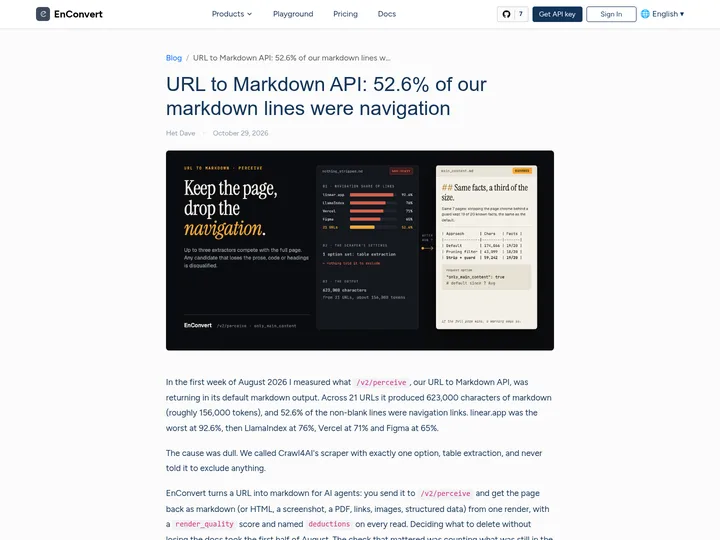
}In the first week of August 2026 I measured what `/v2/perceive`, our URL to Markdown API, was returning in its default markdown output. Across 21 URLs it produced 623,000 characters of markdown […]One page in, its Markdown out
The navigation, header and footer are gone. The article and its table stay.
## Turning the filter up made it worse

The first thing I tested was turning the content filter up. […]

| Same 7 pages, August 2026 | Output size (chars) | Known facts kept |
| --- | --- | --- |
| Default markdown, nothing stripped | 174,066 | 19 of 20 |
| Crawl4AI pruning filter (our `markdown_fit` output then) | 43,099 | 18 of 20 |
| Pruning filter, `threshold=0.8` | 21,085 | 10 of 20 |
| Pruning filter, `min_word_threshold=10` | 16,404 | 7 of 20 |
| Pruning filter, `min_word_threshold=50` | 4,430 | 1 of 20 |
| Readability (our v1 path) | 33,626 | 13 of 20 |
| Strip page chrome behind a guard | 59,242 | 19 of 20 |

At `min_word_threshold=50` navigation hit zero, and five of the seven pages (Chroma, Anthropic, qdrant, Vercel and linear) came back as a single newline character. […]

## What platform.claude.com and figma.com broke

[…]
Real output, captured 2026-11-11. […] marks a cut.
What you send and get
| Field | What it does |
|---|---|
url | The page to read. It is rendered in headless Chrome, JavaScript included. |
outputs | Markdown here. Add a screenshot, a PDF, the links or structured data and the same render produces them. |
only_main_content | On by default. Navigation, header, footer, sidebars and cookie banners are stripped behind a fidelity guard. |
render_quality | From 0 to 1 on every read. Under 0.40 is a failed render, and deductions names the reason. |
billed | One op per URL. A blocked read returns its verdict and is not billed. |
What one call replaces
A headless browser
JavaScript runs, lazy content loads and cookie banners are dismissed.
A boilerplate filter
Up to three extractors compete, and one that loses prose, code or headings is disqualified.
A blocked-page check
Challenge pages and login walls come back flagged, never as content.

Your first Markdown in three steps
Get an API key
X-API-Key: sk_your_private_keySend a URL
POST /v2/perceiveCheck the score, then read
render_quality >= 0.40
More of the same API
- Web Scraping APIOne render, every output, each read scored.
Perceive POST /v2/perceive - RAG Ingestion APIA site or a set of files in, one chunked JSONL out.
Ingest POST /v2/ingest - Structured Data Extraction APIYour schema in, exactly that JSON out.
Distill POST /v2/distill - Web Search APIA query in, ranked results and their pages out.
Lookup POST /v2/lookup - Website Change Monitoring APIWatch a URL and get a webhook when it changes.
Watch POST /v2/watch
Questions about URL to Markdown
How do I convert a URL to Markdown with an API?
Send POST /v2/perceive with {"url": "...", "outputs": ["markdown"]}. The page is rendered in headless Chrome and the response carries a pre-signed download URL for the Markdown file. Add "direct_download": true to receive the Markdown bytes in the response body instead.
Does it render JavaScript pages?
Yes. A read tries a fast fetch with a real Chrome TLS fingerprint first and moves to a headless Chrome render when the page is blocked or needs JavaScript. In the browser, cookie banners are dismissed and the page is scrolled to load lazy content. You can also wait on a CSS selector or run your own JavaScript before capture.
What does the Markdown leave out?
By default only_main_content strips navigation, header, footer, sidebars, cookie banners and hidden nodes behind a fidelity guard. Set only_main_content to false for the full page. Code fences keep their language in both modes.
What happens when a page blocks the read?
The response is still a 200, with is_blocked true, a low render_quality, the named deductions and no outputs. Your agent sees a verdict instead of a challenge page dressed as content, and the read is not billed.
Should I use /v2/perceive or /v1/convert/url-to-markdown?
Use /v1/convert/url-to-markdown when you want one Markdown file with YAML front matter and nothing else. Use /v2/perceive when your code has to tell a real page from a challenge page, or when you also want the screenshot, the links or the metadata from the same render.
What does it cost?
One op per URL read. The free Founding plan includes 500 ops a month with no credit card, and paid plans start at $29 a month.